Replacing Kit (ConvertKit) with a serverless newsletter and CRM solution on AWS
Staying in touch with you, the readers of the cloudonaut blog and newsletter, as well as our customers of bucketAV, attachmentAV, HyperEnv, and marbot is crucial for us. For many years, we have been using Kit -formerly known as ConvertKit- to manage lists and send email sequences and newsletters. However, we got more and more frustrated with Kit. That’s why we decided to build our own solution by putting together a few AWS services: SES, Step Functions, Lambda, and DSQL. Also, we used the project to learn how to use Claude Code when starting from scratch.

Why Kit (ConvertKit) was no longer an option
To reach 3,000 subscribers, Kit charges 590 USD per year. That’s a lot for sending out five newsletters per month and a handful of automated onboarding sequences, in our example.
Also, we had issues with bots spamming our subscription forms, which leads to negative effects on sender reputation and costs. The double opt-in system by Kit is weak. The confirmation email includes a link. When following the link, the email address gets confirmed right away. There is no button on the confirmation page, that needs to be clicked. Unfortunately, many organizations have security systems in place that follow every link in incoming mail automatically, which leads to a confirmed subscriber in Kit, while the actual user never signed up for it.
Besides that, we were limited integrating and automating the newsletter and CRM. Therefore, we’ve been looking for an alternative for quite a while.
Requirements: what a newsletter and CRM tool needs to do for us
So, what do we need to reach the readers of the cloudonaut blog as well as our customers of bucketAV, attachmentAV, HyperEnv, and marbot?
- Send newsletters to tagged subscribers
- Double opt-in signup forms
- Support for multiple sender domains (cloudonaut.io, bucketav.com, attachmentav.com, hyperenv.com, and marbot.io)
- Email sequences (onboarding/offboarding) triggered from our backends
- Templates to style emails for different domains/brands
- Bounce and complaint handling, unsubscribe (RFC 8058 one-click)
We don’t need a web UI for sending emails or configuration. We prefer having the configuration in Git and sending emails from our terminal.
AWS architecture
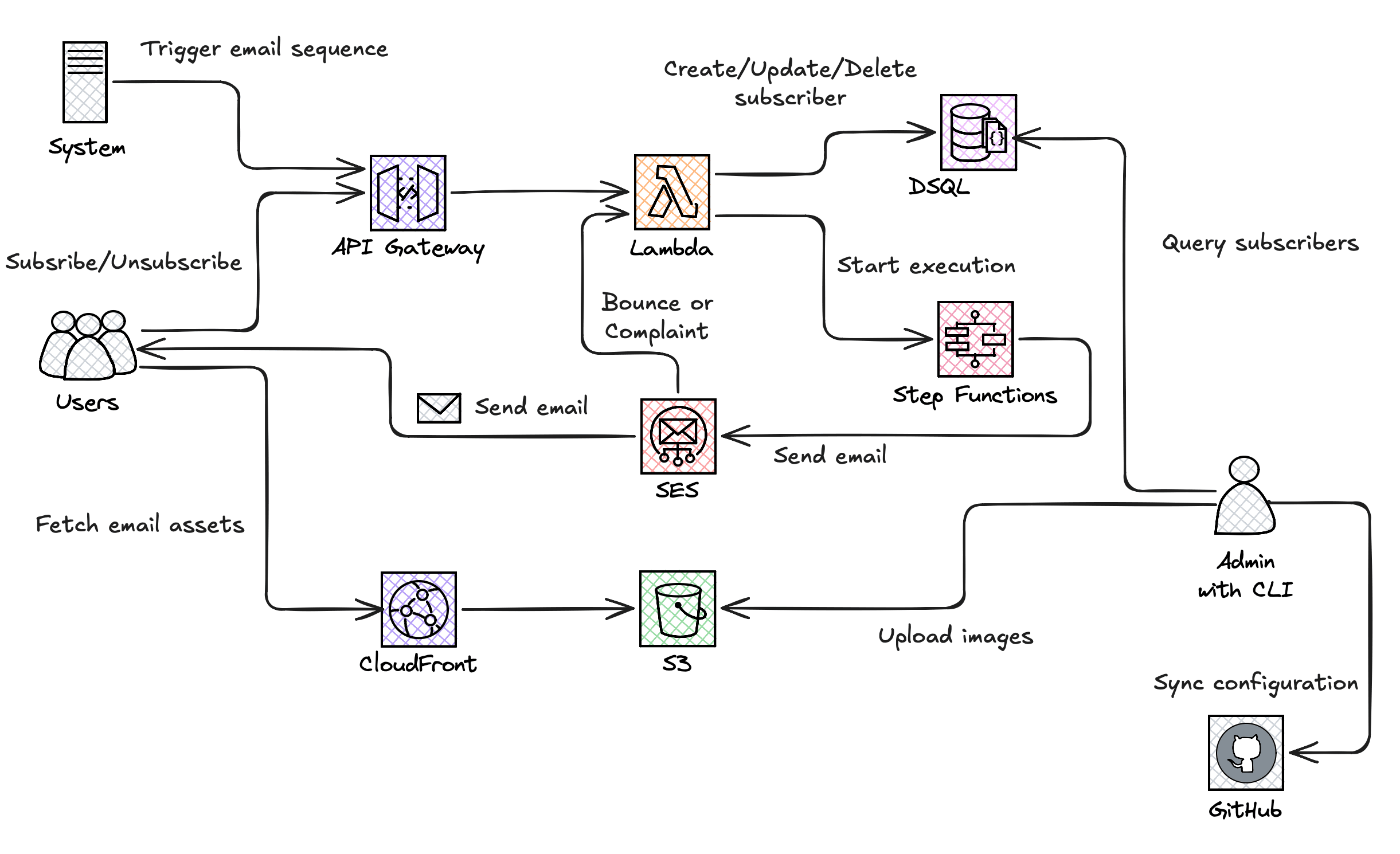
The following diagram illustrates the serverless architecture.
SES: email delivery, bounce/complaint events
Aurora DSQL: store subscribers
API Gateway and Lambda: endpoint for signup, confirmation, and unsubscribe
Step Functions: email sequences (Task → Wait → Task …)
CloudFront and S3: store and distribute assets like images
IAM: authentication and authorization
Backup: manage database snapshots
GitHub: store configuration
The CLI: sending newsletters from the terminal
To keep things simple, we are using a CLI from the terminal instead of a web UI to manage subscribers (e.g., import) as well as to send newsletters.
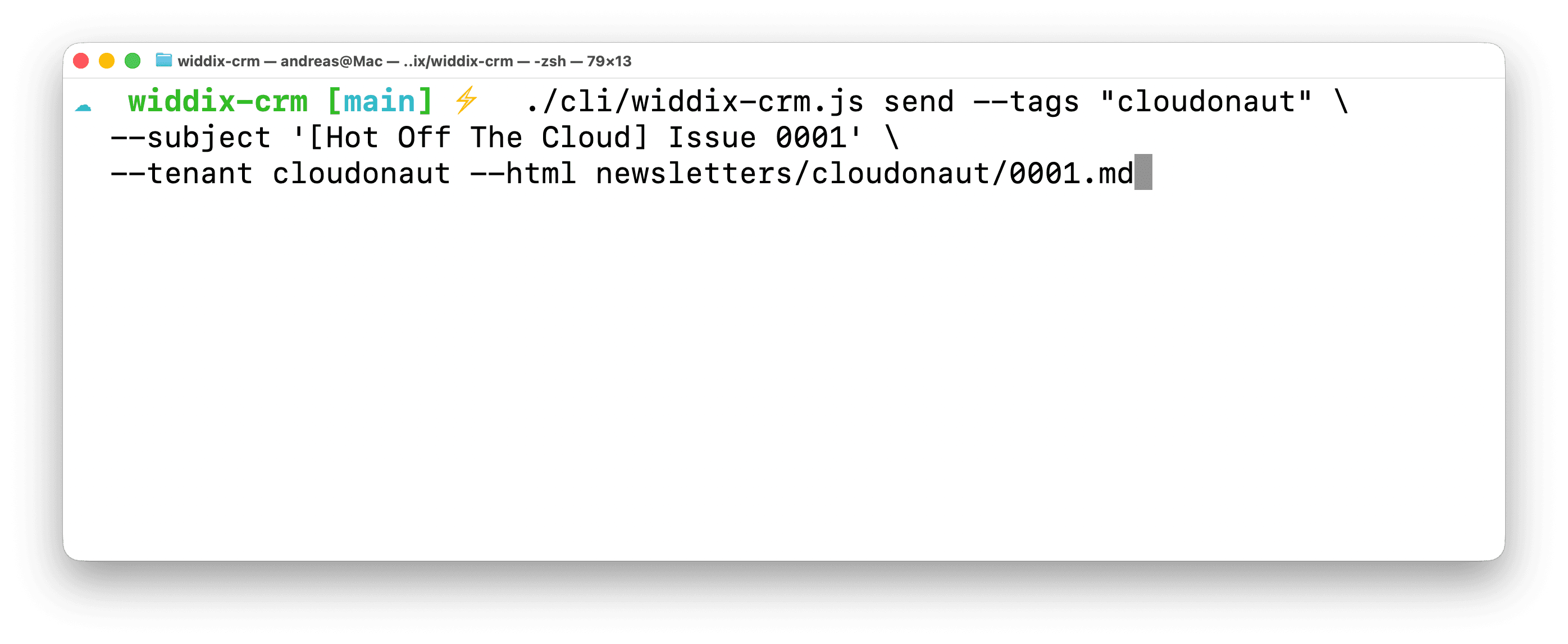
The following screenshot shows how to send a newsletter to all subscribers tagged with cloudonaut.
Here is what the CLI does in the background.
- Upload included images to S3
- Query DSQL for subscribers with tag
cloudonaut - Render HTML and text message
- Send emails via SES
The CLI also allows us to import subscribers from CSV files as well as manually start an email sequence.
Aurora DSQL: simple and cheap for small workloads
Our go-to database on AWS is DynamoDB. However, I wanted to give Aurora DSQL a try. And I’m pleasantly surprised.
Aurora DSQL is a serverless, PostgreSQL-compatible distributed SQL database with active-active multi-region writes and strong consistency. Like DynamoDB, it scales without capacity planning, but it adds relational SQL, joins, foreign keys, and ACID transactions. Compared with RDS/Aurora, it removes instance and failover management, but it still supports only part of PostgreSQL and uses optimistic concurrency, so you need to design for commit-time conflicts and retries.
Here is what I like about DSQL.
- Simple to use
- IAM for authentication and authorization by default
- Usage-based pricing, only storage costs when idle
When starting with the project, DSQL did neither support ID generation nor foreign keys. While this was unexpected for a SQL-like database, it was not a big deal to use UUIDs, as we are used to from DynamoDB. However, over the past months AWS announced and shipped both features.
As DSQL uses optimistic locking, the application has to deal with failed transactions due to conflicts. However, that’s not a big deal in our use case, as we typically add or update a single subscriber in the database only. We don’t use complex transactions spanning multiple tables at all.
Other than that, I could not find any important limitation that hinders us from using DSQL in production.
In the following, I want to share two challenges that we faced.
Challenge: spam protection
The problem of bots spamming our newsletter lists with email addresses was a problem that drove us away from Kit. It turned out that preventing bots from submitting email addresses to our sign-up forms is not as simple as it seems to be.
First, we built a proper double opt-in workflow:
- The user submits a sign-up form for the newsletter
- The backend sends email with a confirmation link
- The user clicks on the confirmation link
- The backend shows a confirmation page with a button
- The user clicks the confirmation button
- The backend marks the subscriber as
confirmed
The workflow ensures that security systems scanning all incoming emails do not accidentally confirm a newsletter subscription by following the link in the double opt-in email.
However, we had the problem that bots submitting the sign-up forms were still causing us to send unnecessary double opt-in emails, which hurts our email sending reputation.
Therefore, we added two additional layers.
The JavaScript on the website responsible for the sign-up form fetches an ALTCHA challenge from the API, solves the proof-of-work in the browser, and posts the solution with the signup request. The server verifies the HMAC signature. The ALTCHA challenge makes it more expensive -think CPU cycles- for bots to submit the form.
On top of that, the site also collects browser signals and posts them with the sign-up form. Collected browser signals are:
- Whether the browser reports being controlled by automation (
navigator.webdriver) - Number of pointer, keyboard, and touch events
- Window size
- Time from page load to sign-up form submission
The backend drops form submissions that are typical for bots: an automated browser, no user interaction at all, or a zero-sized window. The time to submission is only logged to fine-tune the rules.
The spam protection is not perfect. We are tweaking it from time to time. Nevertheless, we managed to reduce the number of bot submissions significantly.
Challenge: SES deliverability
Sending emails is simple. Ensuring that an email lands in a subscriber’s inbox is challenging. After the first complaints about emails not getting delivered, I learned that enabling the SES Virtual Deliverability Manager is crucial.
First, enable Virtual Deliverability Manager in your AWS account and region. I enabled the following features.
- Engagement tracking - opens and clicks provides metrics about opens and clicks, which is crucial for monitoring the deliverability.
- Optimized shared delivery is an option for senders using the shared IP addresses provided by AWS.
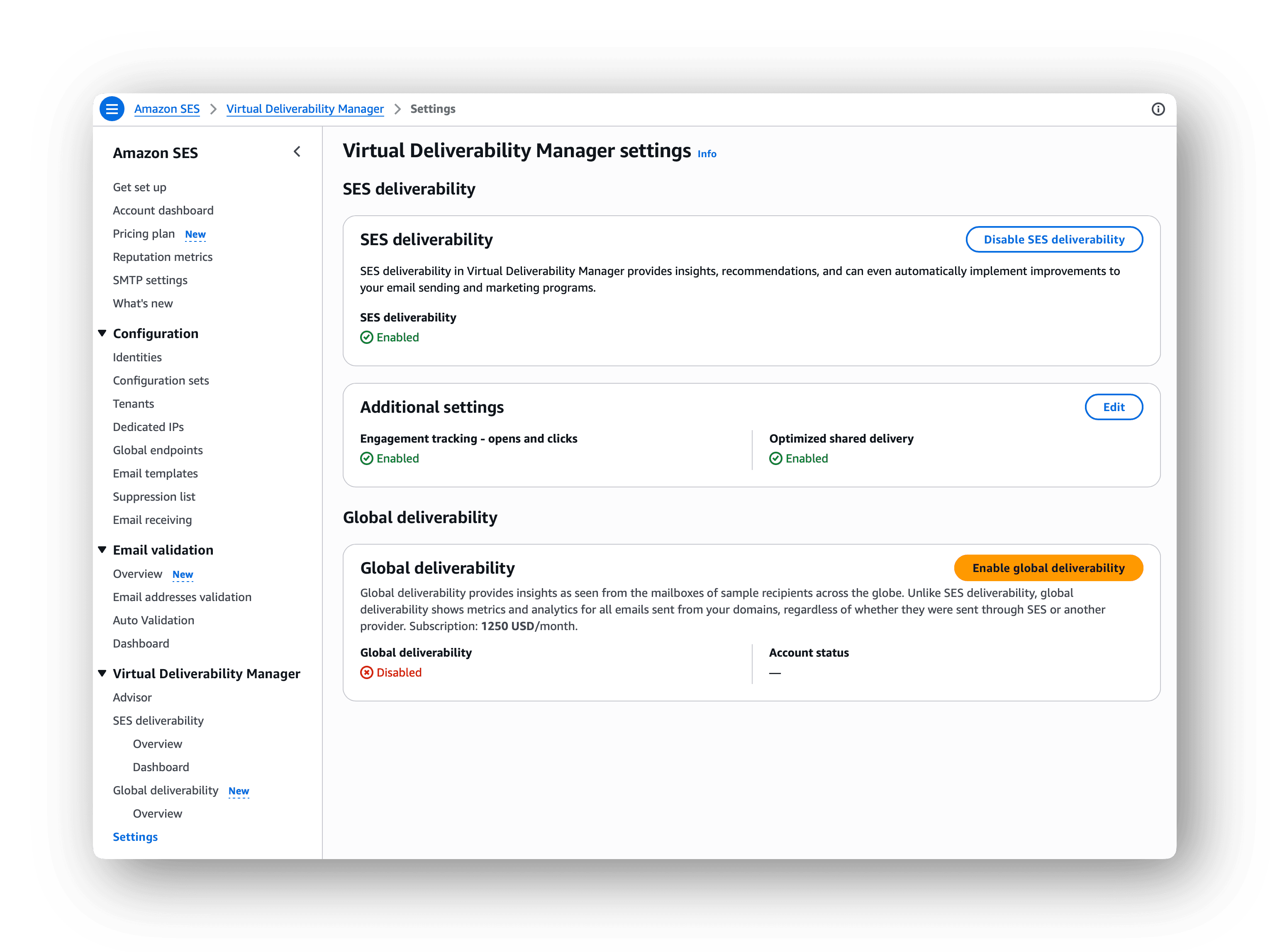
Enabling the SES Virtual Deliverability Manager adds additional costs of 0.07 USD per 1,000 outbound emails. See SES pricing for details.
Next, I recommend following the advisor guiding you through setting your domains up for email sending with SES, including DMARC, DKIM, SPF, and BIMI.
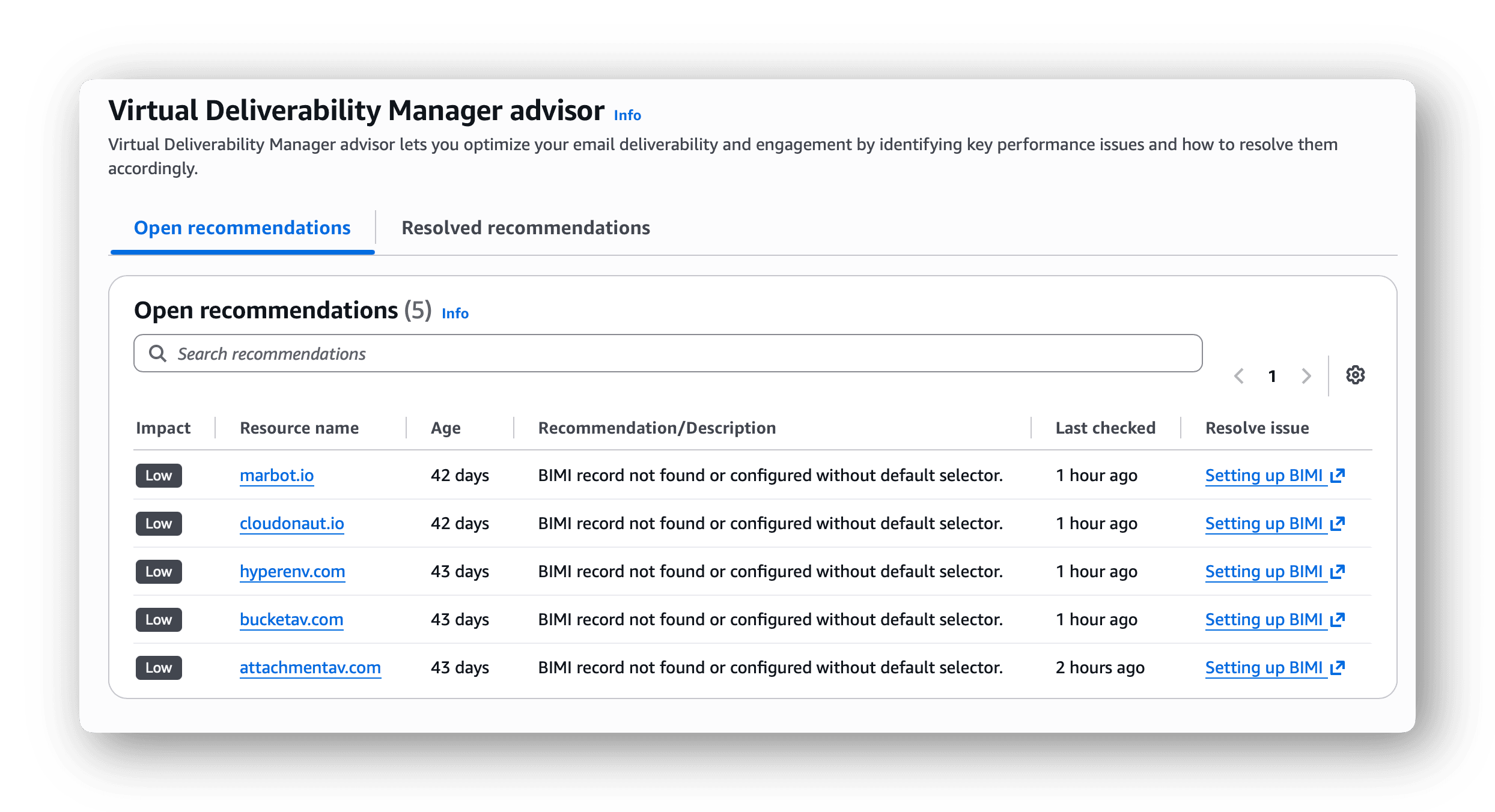
Also, metrics on opens and clicks are now showing up in the dashboard. Those metrics allow you to monitor the deliverability of newsletters and sequences.
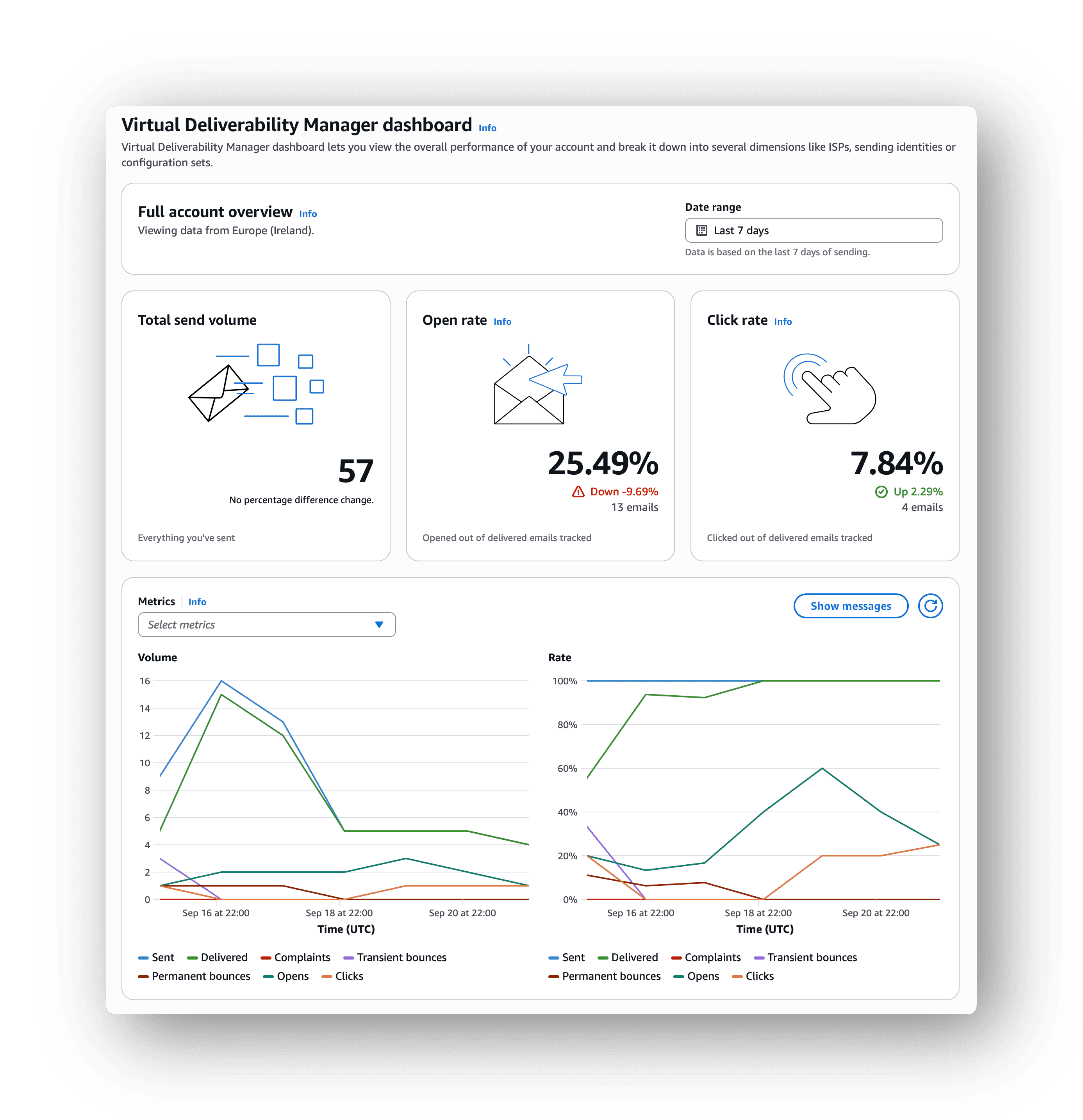
It took me a while to figure things out. But now, I’m happy with the deliverability of the emails we are sending to readers and customers.
Coding with Claude
To be honest, the whole project of building our own newsletter and email sequence solution would not have happened without Claude Code. I used this project as an opportunity to learn new things and to stay motivated while the rest of my time went into boring tasks such as tax compliance.
Here is the timeline of the project:
- Describe the required features
- Design the AWS architecture
- Let Claude build the first version
- Deploy to production
- Iterate while onboarding one domain and subscriber group after another
- Tweak spam protection and deliverability
I carefully reviewed the code and all changes. I spotted very few issues, for example an IAM policy was not defined properly.
Also, I remember how easy it was to feed Claude Code with old newsletter emails to come up with templates for the new system. It was a blast.
Claude struggled a little bit to come up with working spam protections for our sign-up forms. Which led me to do my own research and hand over the results to Claude.
Overall, I was impressed by how fast a simple solution could be built by putting together AWS building blocks with the help of Claude.
Costs and results
Before, we paid 590 USD per year for Kit.
Now, the costs for sending 5,000 newsletter emails and 200 automated emails triggered by sequences less than 1 USD per month as shown in the following table.
| Service | Monthly Costs |
|---|---|
| DSQL | 0.00 USD (Free Tier) |
| Step Functions | 0.00 USD (Free Tier) |
| SES | 0.88 USD |
| Lambda | 0.00 USD (Free Tier) |
| S3 | 0.03 USD |
| CloudFront | 0.00 USD (Free Tier) |
There are no baseline costs; all services are charged pay-per-use.
I’ve spent 40 hours on this project. I expect the ongoing maintenance work to consume less than an hour of my time per month.
The share of our Claude subscription attributable to this project is about 25 USD so far.
Besides that, I’m already planning how to improve our communications with readers and customers based on this flexible newsletter and CRM system.
Summary
The building blocks SES, Lambda, Step Functions, API Gateway, CloudFront, and S3 enable a cost-effective and scalable newsletter and CRM solution. Starting a greenfield project with Claude Code was a lot of fun. Also, DSQL is definitely worth a look as an alternative for DynamoDB, as it is easy to use.
I’m thinking about sharing our newsletter and CRM solution as an open-source project. Please let me know, if you are interested.
Andreas Wittig

I’ve been building on AWS since 2012 together with my brother Michael. We are sharing our insights into all things AWS on cloudonaut and have written the book AWS in Action. Besides that, we’re currently working on bucketAV, attachmentAV, HyperEnv, and marbot.
Here are the contact options for feedback and questions.