Secure AWS credentials for Claude Code and other coding agents
Are you typing aws sso login and claude into your terminal? Your AWS resources are at risk! Your coding agent has access to all AWS roles that your AWS SSO session is authorized to assume. And if your setup is similar to mine, you do have access to IAM roles with AdministratorAccess.

The Problem: AWS credentials accessible by Claude Code
Relying on the built-in boundaries of a coding agent is risky. When granting an agent access to AWS resources, following the least privilege principle is a must. Therefore, defining IAM roles for agent access is necessary. But you also need to ensure that the agent does not have access to ~/.aws on your local machine. That’s where the AWS tools store credentials and SSO sessions. So you have to restrict access to that folder.
And by the way, there are most likely many other secrets stored on your machine as well. Think about SSH keys and GitHub tokens, for example.
The Journey: From copy and paste to AWS MCP Server, Lambda MicroVMs, and Docker Sandboxes
Over the past weeks, I tried to find a solution to the problem. Here is my journey.
First, I decided to remove all AWS credentials from my machine. Instead I copied and pasted temporary AWS credentials into my terminal sessions. But that’s definitely not very convenient.
As a next step, I tried the AWS MCP Server, a managed, remote MCP server hosted by AWS. It works well and has solid security features. With OAuth, the agent only holds a short-lived token. With SigV4 and the MCP Proxy for AWS, the agent can also switch between profiles to work across accounts. IAM condition keys let you treat requests from the agent differently from your own, and CloudTrail records the activity.
However, I ran into two limits:
- The agent only gets the tools of the MCP server: documentation search and a sandboxed Python environment (
aws___run_script) to call AWS APIs. It cannot run the AWS CLI or use the AWS SDKs in its own environment. - With SigV4, the proxy runs on your machine next to the agent and reads
~/.aws. Only the profiles you pass to the proxy are offered as tool options, but nothing keeps an agent with file access from reading your SSO session and credentials directly. OAuth avoids that, but each session is bound to a single IAM role, so it does not work across accounts.
I wanted both: strong isolation and native use of the AWS CLI and the SDKs.
Therefore, I used AWS Lambda MicroVMs to spin up temporary self-hosted environments for Claude Code next. By assigning an IAM role to the MicroVM, the agent can access AWS through that role. However, I did not like interacting with the agent through the Claude web interface instead of the terminal. Also, it requires you to authorize Claude’s GitHub app, which grants the agent broad access to every repository you authorize it for. In my opinion, that’s too much access for my taste.
Finally, I ended up using Docker Sandboxes. Docker Sandboxes is Docker’s tool for running AI coding agents (like Claude Code, Codex, or Copilot CLI) inside a dedicated microVM with its own Linux kernel. The agent can install packages, run containers, and work unattended without being able to touch your host filesystem, network, or Docker daemon. Docker Sandboxes keeps secrets on the host and has a proxy overwrite the auth header on outgoing requests. That fails for AWS, because AWS doesn’t use a static API key header. Instead, each request is signed with the secret key (Signature Version 4), and the signature covers the request itself, so a proxy cannot simply inject it. Therefore, I built a broker that hands the sandbox only temporary credentials, so the agent can sign requests itself.
The Solution: Temporary AWS credentials in Docker Sandboxes
I built sbx-aws-developer, which brings AWS to agents in Docker Sandboxes: the tools, and temporary credentials from your IAM Identity Center session on the host, with the AWS profiles chosen per sandbox.
It consists of two parts, because the tools belong inside the sandbox while the credentials must come from the host:
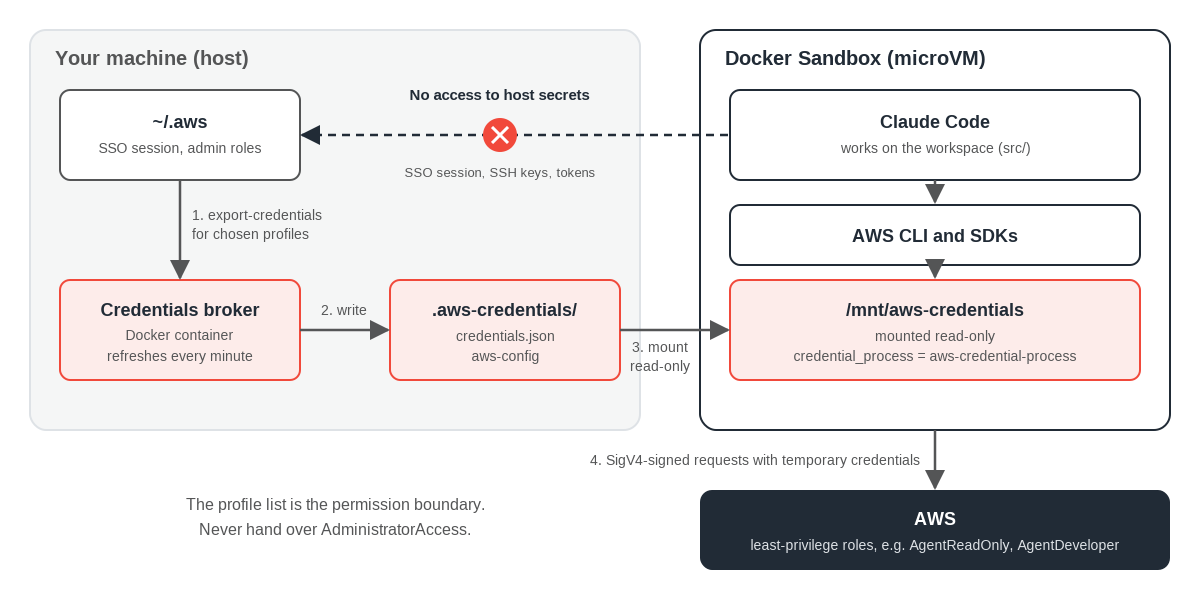
aws-developer/is a kit, published aswiddix/sbx-kit-aws-developer: an image layered on top of an agent workload such asclaude. It brings the tools and the AWS setup.broker/is the AWS credentials broker, published aswiddix/sbx-aws-developer: a container on the host’s Docker that hands temporary credentials for selected AWS profiles to one sandbox. It writes them to a directory that the sandbox mounts read-only.
The agent only sees these temporary credentials. It never sees your ~/.aws directory or your SSO session. The list of profiles is therefore your permission boundary: create dedicated, least-privilege permission sets for agents, and do not hand over a profile with AdministratorAccess. Keep in mind that the agent can read the credentials of every profile assigned to the sandbox, and that everything in the workspace is visible to it.
How It Works
Every minute, the broker runs aws configure export-credentials for each profile and replaces the credentials before they expire. It writes two files to the credentials directory, which the sandbox mounts read-only at /mnt/aws-credentials:
credentials.jsonholds theAccessKeyId,SecretAccessKey,SessionToken,Expiration, andAccountIdper profile.aws-configis an AWS config file with one profile per entry. Each profile usescredential_process = aws-credential-process <profile>, which fetches fresh credentials on demand. In the sandbox,AWS_CONFIG_FILEpoints to this file, so the AWS CLI and the SDKs work as usual. You select a profile withAWS_PROFILE.
The credentials last as long as the session duration of the permission set: one hour by default, up to twelve. When your SSO session expires, the exported credentials run out, and the error in the sandbox asks for aws sso login on the host. The broker picks up the new session within a minute. Profiles with sso_start_url directly in the profile, instead of an sso_session, need aws sso login again when their access token expires. Profiles with long-term access keys are refused.
AWS Profiles
The profiles are defined in ~/.aws/config on the host and use an IAM Identity Center session, for example:
[sso-session my-sso] |
Both profiles share one SSO session, so a single aws sso login --sso-session my-sso is enough.
Limitations
- Stopping the broker does not revoke credentials that an agent copied. They stay valid until they expire. Prefer permission sets with a short session duration.
- The kit allows egress to
**.amazonaws.comand other AWS domains. Issued credentials can therefore be used against any account and region they are valid for. - The broker mounts
~/.awsread-write, because the AWS CLI writes the SSO token cache when it refreshes. The sandbox itself never sees this directory. - The commands are written for the shell on macOS and Linux.
sbx envis experimental.- Kits and mounts apply only when a sandbox is created. After changing them, remove the sandbox and start it again. A changed profile list or command requires approval on the host.
Getting Started
Requires
sbx0.45 or later and Docker. Tested withsbx0.54. Both images come from Docker Hub, so nothing of this repository is installed or checked out on the host; the AWS CLI is only needed foraws sso login.
Give each project a directory of its own, for example in ~/Developer/env. It holds the environment file for sbx next to src, which contains the repositories of the project: one, or several that belong together and that the agent works on in the same context, such as a backend, a frontend and their infrastructure:
~/Developer/env/ |
Only src is mounted into the sandbox as its workspace, so the agent sees all repositories of the project, but can neither read nor change sbxenv.yaml, and nothing of the setup ends up in a repository. Repositories that are not used together go into separate projects, each with its own sandbox and AWS profiles.
Sign in to IAM Identity Center on the host, with the SSO session of your AWS profiles:
aws sso login --sso-session my-sso
Create the project directory and check out the repositories of the project into
src:mkdir -p ~/Developer/env/my-project/src
cd ~/Developer/env/my-project/src
git clone <backend-repository-url> backend
git clone <frontend-repository-url> frontend
git clone <infra-repository-url> infraPut this
sbxenv.yamlinto~/Developer/env/my-project. Setname, and replaceaws-profile-1,aws-profile-2with the names of the AWS profiles the sandbox may use; the rest stays as it is:schemaVersion: "1"
agent: claude
name: my-project
workspace: ./src
args:
profiles:
default: aws-profile-1,aws-profile-2
description: AWS profiles of the host that the sandbox may use, separated by commas
pattern: "[A-Za-z0-9._-]+(,[A-Za-z0-9._-]+)*"
kits:
- widdix/sbx-kit-aws-developer:1.0.0
additionalWorkspaces:
- path: ${{ env.fileDir }}/.aws-credentials
target: /mnt/aws-credentials
readOnly: true
lifecycle:
initialize:
- name: Start the AWS credentials broker
command: >-
mkdir -p "${{ env.fileDir }}/.aws-credentials";
docker rm -f "sbx-aws-developer-$SBX_SANDBOX_NAME" >/dev/null 2>&1;
docker run -d --name "sbx-aws-developer-$SBX_SANDBOX_NAME"
--restart unless-stopped --init --user "$(id -u):$(id -g)"
-v "$HOME/.aws:/home/sbx-aws-developer/.aws"
-v "${{ env.fileDir }}/.aws-credentials:/data"
widdix/sbx-aws-developer:1 ${{ env.args.profiles }}
preRemove:
- name: Remove the AWS credentials broker
command: >-
docker stop "sbx-aws-developer-$SBX_SANDBOX_NAME";
docker rm "sbx-aws-developer-$SBX_SANDBOX_NAME"Start the sandbox from the project directory and approve the host commands:
cd ~/Developer/env/my-project
sbx env run
In the sandbox, pick one of your profiles and check the credentials:
AWS_PROFILE=aws-profile-1 aws sts get-caller-identity
For another project, copy the directory layout and the sbxenv.yaml, and change name and the profiles. The .aws-credentials directory sits next to src, so it is never part of a repository.
When you remove the sandbox, the preRemove step stops and removes its broker container.
The kit is pinned to a full version (1.0.0) because latest could move to a kit that needs a newer sbx. The broker image uses the major tag :1, so you get updates within version 1. To update it, run docker pull widdix/sbx-aws-developer:1 and start the sandbox again with sbx env run.
Conclusion: Least-Privilege AWS Access for Coding Agents
Docker Sandboxes keeps the agent away from your host, and the broker gives it just enough AWS access to be useful. The result is a setup where the agent uses the AWS CLI and SDKs as usual, while your SSO session, SSH keys, and other secrets stay on the host. Your feedback is welcome: please open an issue or pull request in the sbx-aws-developer repository.
Andreas Wittig

I’ve been building on AWS since 2012 together with my brother Michael. We are sharing our insights into all things AWS on cloudonaut and have written the book AWS in Action. Besides that, we’re currently working on bucketAV, attachmentAV, HyperEnv, and marbot.
Here are the contact options for feedback and questions.